You are using an unsupported browser. Please update your browser to the latest version on or before July 31, 2020.
close
You are viewing the article in preview mode. It is not live at the moment.
Home > External Articles > How to Find Your Device Name
How to Find Your Device Name
print icon

How to Find Your Device Name

Need to locate your computer's name? Follow these quick steps: 


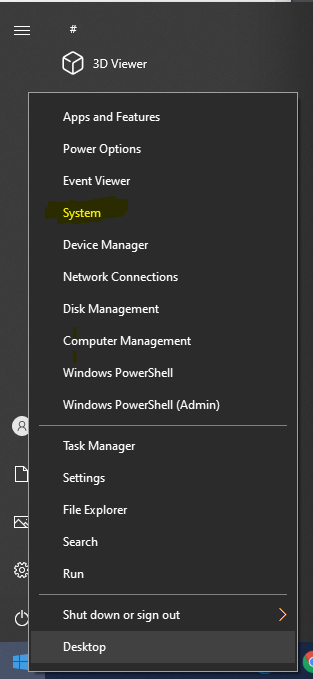
1. Right-click the Windows icon on your taskbar.


2. Select "System" from the menu. 


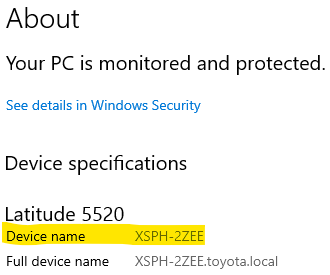
3. On the About page, look for "Device name."

This is your computer’s name; you may be asked to provide it when submitting IT tickets or troubleshooting issues.


That's it! You've successfully found your device name. 


Feedback
0 out of 0 found this helpful

scroll to top icon