


 149
149
Reporting Junk or Phishing Emails in Outlook
Keep your inbox safe by reporting suspicious emails directly through Outlook. Follow the steps below for both the Outlook Desktop Client and Outlook Web Access (browser).
1. Locate the Report Message button
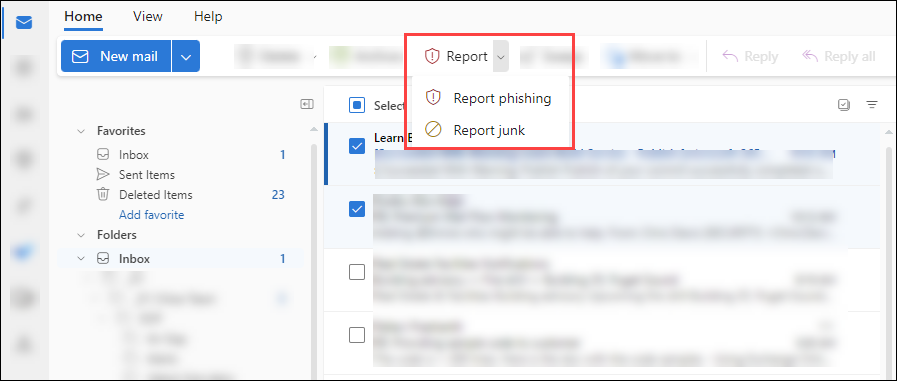
At the top of your Outlook window (in the ribbon, to the right), click the Report Message button.
-
Outlook for Microsoft 365:

-
Outlook on the web:

2. Choose the appropriate category
Click the down arrow next to Report Message, then select either Junk or Phishing.
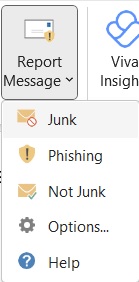
Here’s the difference:
-
Junk: Unwanted advertisements or bulk emails (e.g., promotions, newsletters).
-
Phishing: Emails that try to trick you into clicking fake links or sharing personal information.
3. Confirm your report
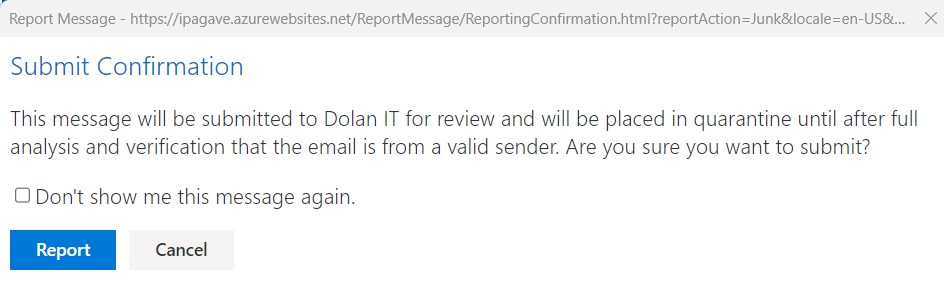
After selecting Junk or Phishing, you'll see a confirmation prompt.
-
Click Report to continue.
-
To stop seeing this message in the future, select “Don’t show me this message again.”
4. What happens next
Once reported, the email is:
-
Automatically removed from your inbox
-
Sent to IT for internal review and placed in quarantine
If IT confirms the email is spam or phishing:
-
It will be blocked at the mail filter to prevent future sends
-
It will be forwarded to Microsoft for external analysis
If IT confirms the email is legitimate, it will be released and returned to your inbox.
No Need to Email IT
You no longer need to forward suspicious emails to [email protected]. The Report Message button takes care of everything automatically.
Understanding SPAM vs. Phishing
SPAM (Junk Mail):
-
Usually commercial or promotional in nature
-
Annoying but not typically harmful
-
Examples: Coupons, chain forwards, donation requests, newsletters
-
Protected under the CAN-SPAM Act of 2013, which requires opt-out options
PHISHING:
-
Actively tries to steal sensitive information (passwords, banking info, etc.)
-
Often mimics legitimate senders or brands
-
Can lead to identity theft or company security breaches
Common signs of phishing emails:
-
Misspelled words or grammatical errors
-
Links that don’t match their displayed text
-
Requests for personal or login information
-
Forms embedded directly in the email
-
Emotional or urgent language (“Your account will be suspended!”)
When in doubt, report it!

